

Rename Compound Clips in CapCut

If you’ve been using CapCut’s desktop version and working with compound clips, you might have run into a frustrating problem—there’s no obvious way to rename them!
Many CapCut users have reported that they can’t find an option to rename compound clips. The feature isn’t in the timeline, the properties panel, or anywhere intuitive.
Step-by-Step Guide
Step 1: Go to the Media Tab
Open CapCut and navigate to the ‘Import’ section under ‘Media.’
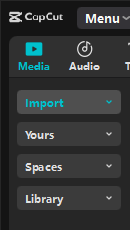
You should see an Import button to the right, and under that will be where your subprojects (Compound Clips) live.
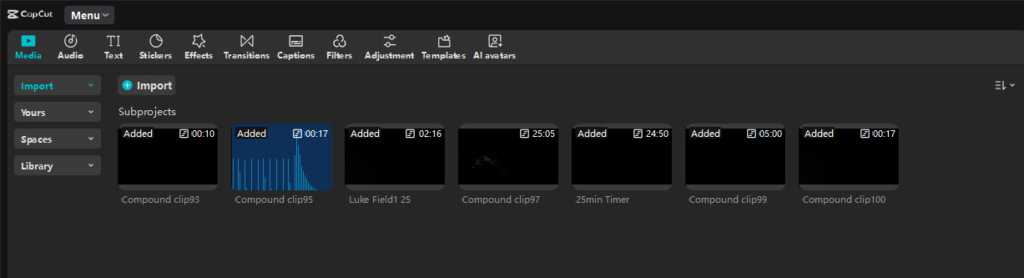
If you do not have any Compound Clips (Subprojects) yet, go ahead and create one and return here to find it in the list.
Step 2: Identify Your Clip
Once you create a Compound Clip, CapCut will automatically generate a generic name for it, like "Compound clip93", so you want to match the clip name from your timeline with the one listed under subprojects.
Step 3: Right-Click to Rename
Now that you've created a Compound Clip and have identified the correct clip from you timeline, all that's left to do is rename it!
Right click the correct Compound Clip listed under Subprojects to reveal the context menu. Select rename.
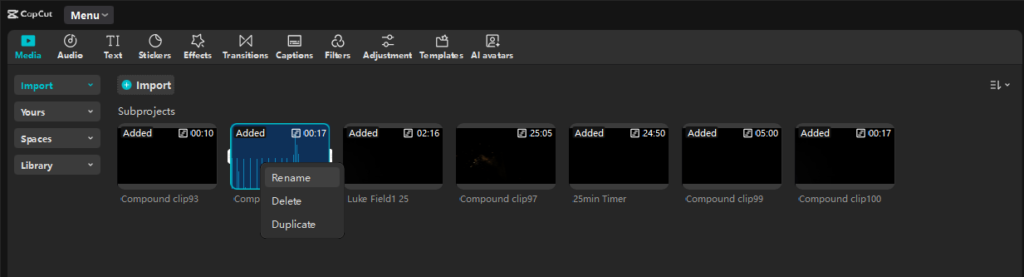
And that's it! You've renamed your Compound Clip! 👏🏽
Why This Matters
Renaming compound clips is crucial for keeping complex projects organized. If you frequently use compound clips for advanced editing, this hidden feature can save you tons of time and frustration.
Imagine how much more efficient you can be with your videos!
Why Is This So Hard to Find?
I'm not sure why CapCut doesn’t make this function obvious. When I tried searching for the answer, I found that most users don’t think it actually exists.
You wouldn't think to check the Import section, that's for sure!
Final Thoughts
If you’ve been struggling to rename compound clips in CapCut, now you know the secret!
Hopefully, this guide saves you some headaches.
Don't forget that you can edit your compound clips by double clicking them!
Share this with fellow CapCut editors who might be facing the same issue.


